Wednesday, 14 February 2018

Array in Java

INTRODUCTION OF ARRAY

Aaary is collection of homogenous data type. An array is defined as a sequence of object of the same data type. All the elements of an array are either of type int (Whole numbers) , or all of them are of type char, or all of them are of floating decimal point type,etc.
An array connot have a mixture of different data types as its element. In computer memory ,array elements are store in a sequence of adjacent memory blocks.
The declaration of array includes the type of array that is the type of value we are going to store in it, the array name and maximum number of elements.
Examples:
short val [200];
val [12] = 5;  


Declaration & Data Types:
Arrays have the same data types as variables, i.e., short, long, float etc. They are similar to variables: they can either be declared global or local. 
They are declared by the given syntax:

Datatype array_name [dimensions] = {element1,element2,….,element}

The declaration form of one-dimensional array is:
Data_type array_name [size];
The following declares an array called ‘numbers’ to hold 5 integers and sets the first and last elements. C arrays are always
TYPES OF ARRAY
One-Dimensional Array:
One Dimensional array are same as those used variable names. Every array given same name. The declaration of one-dimensional array takes the following form:
Array _type array_name[array_size];

We can declare arrays of any built-in type such as char, float, unsigned int, etc. In addition, we can declare arrays of user-defined types such as structures, enumerated data types, etc. Note the can declare one or more arrays in a single declaration statement. We can also mix scalar variables and arrays in a declaration statement.
Syntax:- Int a[]={};
Or
Int[] a={};
Or
Int a[] = new int a[]
Two-Dimensional Array:
A two-dimensional array (commonly called a matrix) consists of elements of the same type arranged in rows and columns. The rows and columns of a matrix are numbered starting from 0. Thus, for an array of size rows x cols, the row subscripts are in the range 0 to rows - 1 and the column subscripts are in the range 0 to cols – 1.

Syntax:-
Array_type arrry_name [rows] [cols];

Constructor in Java

Constructor

Constructor in java is a special type of method that is used to initialize the object.In Java, constructor is a block of codes similar to method. It is called when an instance of object is created and memory is allocated for the object. Java constructor is invoked at the time of object creation. It constructs the values provides data for the object that is why it is known as constructor.  You cannot write two constructors that have the same number and type of arguments for the same class.

Syntax Java Constructors:-

The new keyword creates the object of class Myname and invokes the constructor to initialize this newly created object.

Rules for creating java constructor

There are basically two rules defined for the constructor.
  1. Constructor name must be same as its class name
  2. Constructor must have no explicit return type

Types of java constructors:-

  1. Default constructor (no-arg constructor)
  2. Parameterized constructor

Java Default Constructor:-

A constructor is called "Default Constructor" when it doesn't have any parameter. Java compiler will automatically create a no-argument constructor during run-time. This constructor is known as default constructor. The default constructor initializes any uninitialized instance variables.

Syntax of default constructor:-

<class_name>(){}
Default Constructor Example:-

public class EX_Costructor {

public EX_Costructor() {
// null or non parameterized constructor;
}

public static void main(String[] args) {

EX_Costructor object = new EX_Costructor();
object.hello();

}

public void hello() {
System.out.println("Hello Constructor");
}


}

Output:-
Hello Constructor

Explanation: In the above class, you are not creating any constructor so compiler provides you a default constructor. Here 0 and null values are provided by default constructor because 0 value show integer and Null value show String.

Java parameterized constructor:-

A constructor which has a specific number of parameters is called parameterized constructor.
Parameterized constructor is used to provide different values to the distinct objects.
ClassName (arg1,arg2, arg3,………argn){
// constructor body
}
  1. Constructor Can Take Value , Value is Called as – Argument.
  2. Argument can be of any type i.e Integer, Character, Array or any Object.
  3. Constructor can take any number of Argument

Constructor Overloading:-

Constructor overloading in Java is a technique of having more than one constructor with different parameter lists. They are arranged in a way that each constructor performs a different task. They are differentiated by the compiler by the number of parameters in the list and their types.Constructor overloading is a concept of having more than one constructor with different parameters list, in such a way so that each constructor performs a different task. In Java, a constructor is just like a method but without return type. It can also be overloaded like Java methods.

Important notes:-

  • Constructors are invoked implicitly when you instantiate objects.
  • The two rules for creating a constructor are:
    • A Java constructor name must exactly match with the class name.
    • A Java constructor must not have a return type.
  • If a class doesn't have a constructor, Java compiler automatically creates a default constructor during run-time. The default constructor initialize instance variables with default values. For example: int variable will be initialized to 0
  • Constructor types:
    • No-Arg Constructor - a constructor that does not accept any arguments
    • Default Constructor - a constructor that is automatically created by the Java compiler if it is not explicitly defined.
    • Parameterized constructor - used to specify specific values of variables in object
  • Constructors cannot be abstract or static or final.
  • Constructor can be overloaded but can not be overridden.

Some Important detail of First Java Program

Some Important detail of First Java Program

  • Class:- This keyword is used to declare a class in java and class is the collection of object. 
  • public:- This keyword is an access modifier which represents visibility, it means it is visible to all. It means it is open to use by all other class like a public park which is open for all. 
  • static:- This is a keyword, if we declare any method as static, it is known as static method. The core advantage of static method is that there is no need to create object to invoke the static
    method. The main method is executed by the JVM, so it doesn't require to create object to invoke
    the main method.
  •  void:- is the return type of the method, it means it doesn't return any value. 
  • main:- represents startup of the program. It’s start the execution of main program 
  • String[] args:- it is used for command line argument.it change line into String for jvm. 
  • System.out.println():- is used print statement. System is a class itself. out is used to make output stream. Print is used to print something on display. println is same but it send cursor to next line after execution of code. 
  • String[] args: it can represented by Many ways
    1. public static void main(String[] args) 
    2. public static void main(String []args) 
    3. public static void main(String args[]) 
    4. public static void main(String[] args) 
    5. public static void main(String []args) 
    6. public static void main(String args[])

Friday, 15 December 2017

Operators in Java

Operators in Java


Operators are the symbols which are use to perform operations in Java program like +,-,/,* etc...

Types of Operator:

  1. Arithmetic operator
  2. Relational operator
  3. Logical operator
  4. Bitwise operator
  5. Assignment operator
  6. Shift operator
  7. Ternary operator
  8. Unary operator

Here we have the symbol orientation of Operators:


Operator NameSymbol
Unaryx++(post Increment), ++x(Pre Increment)
x--(Post decrement), --x(Pre decrement)
Arithmetic(+, -, *, /, %)
Shift<<, >>
Relational<, >, <=, >=, ==, !=
Bitwise&, ^, |
Logical&&, ||
Ternary? :
Assignment=


Arithmetic Operator Example:


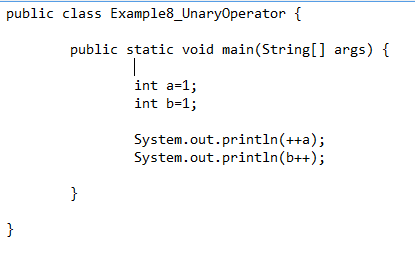
Unary Operator Example:


Shift Operator Example:


Relational Operator Example:


Bitwise and Logical Operator:

Thursday, 14 December 2017

Data Types

Data Types


Data-types indicates the type of data which helps variable to store the value according to the data-type.

In java there are two types of data types present:

  1. Permitive
  2. Non-Permitive
DataTypes

How to initialize data type with variable:


Variable

Variable

Variable is name of memory, which use to allocate reserve memory location. It is also called as "VARY+ABLE" which means vary can be changed.

Here a is used to allocate memory to variable


Types of Variable:


  1. Local Variable: Which is initialize inside the method is called as local variable.

  2. Instance Variable: Which is initialize inside the class but outside the method is known as Instance variable.

  3. Static Variable: A variable which is declared as Static is known as static variable, A static variable can not be used as local variable.


Example


public class Second
{
static int a = 10;//Global Variable
static int c;// instance Variable
public static void main(String[] args)
{
   int b = 20;// Local Variable
  
   c=a+b;
   System.out.println(c);
    }
}

Thursday, 7 December 2017

How to Create and Run First Java program

First Java Program

How to write a java code. After installation of java it will be more easy to write code in java. Let's start with the programming:

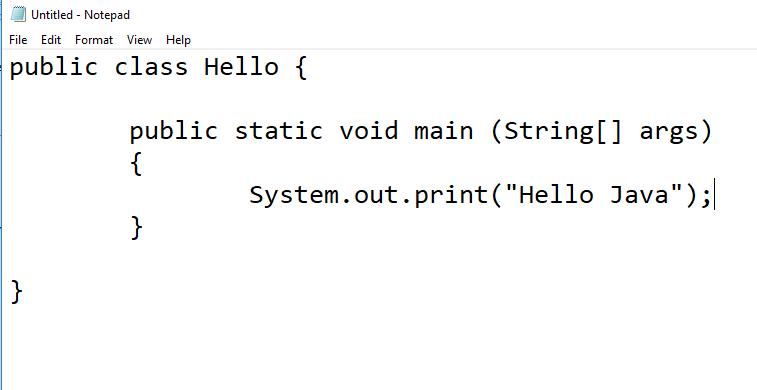
  • First open your notepad and write the code in it :


  • After writing the code save the file in your system like I saved my file in E:\ drive :
  • Now after saving open your command prompt window and type javac with class name i.e Hello tp compile the profram:: type javac Hello.java and hit enter.
  • Then to run the program and see the output on command window type java.Hello